DecisionMines
Simplifying AI workflows


/ Background
Simplifying AI workflows for system analysts with an intuitive platform
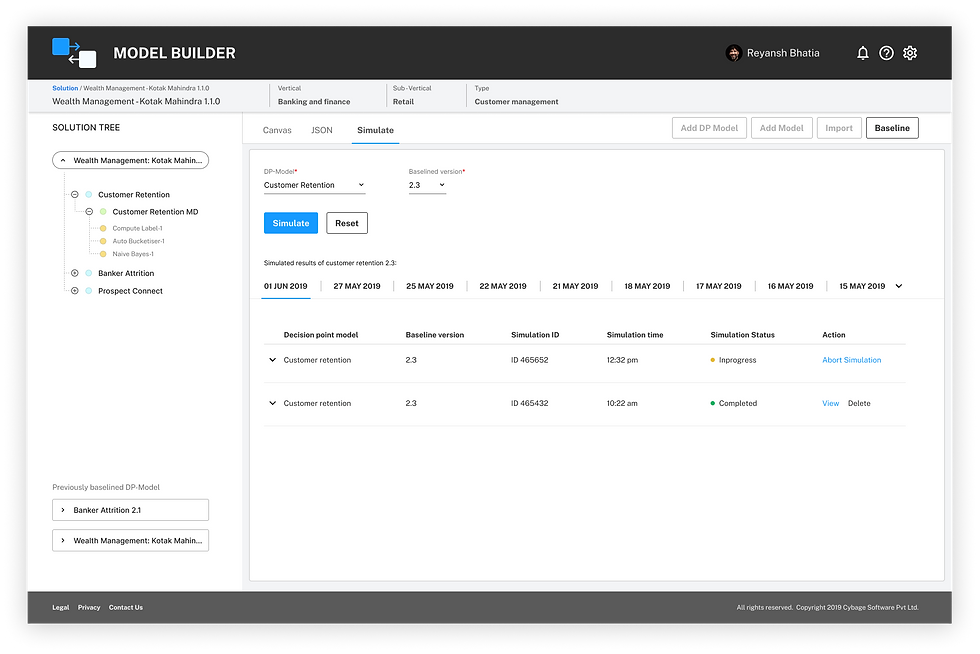
Model Builder is an intuitive platform that helps system analysts create, modify, and test machine learning models for automated workflows. Organizations rely on these workflows to process large amounts of data efficiently, but configuring and validating them manually is complex and time-consuming.
Before Model Builder, system analysts had to rely on spreadsheets, code-based configurations, and multiple disconnected tools, making the process inefficient and error-prone. This case study highlights how I designed a seamless user experience, reducing complexity and improving efficiency.
/ Challenge
System analysts faced inefficiency, poor visibility, and complex workflows.
System analysts struggled with:
-
Limited system visibility.
-
Complex workflow configuration.
-
Reliance on spreadsheets and code for validation.
-
Inefficient error detection and troubleshooting.
The goal was to create a user-friendly platform that simplified model configuration, improved workflow visualization, and reduced errors.
/ Solution

01 Research and insights:
I conducted user interviews with system architects and analysts to understand their workflow.
Key takeaways:
-
Users needed a clear, visual way to configure and validate workflows.
-
Error handling had to be simplified to reduce cognitive load.
-
Navigation needed to be intuitive and structured for quick access.
Personas: Based on research, we identified two key personas:
-
Sneha (System Analyst): Detail-oriented, hyper-organized, works with cross-functional teams, and needs a quick way to validate workflows before delivery.
-
Satish (Subject Matter Expert): Analytical, works with data technologies, and needs a tool to visualize, design, and validate workflows efficiently.
02 Design strategy and principles:
Guided by user goals, we established key design principles to ensure usability:
Reduce Cognitive Load
Minimize complexity with clear, structured UI.
Intelligent use of colors
Highlight key actions and errors effectively.
Crisp information
Provide relevant details without overwhelming users.
Contextual relevance
Ensure information is available where users need it.
Familiar, Intuitive UI
Avoid alien patterns and maintain consistency.
03 Ideation and core design features:
During ideation, we explored various ways to improve workflow creation.
I designed and tested low-fidelity wireframes followed by high-fidelity prototypes to ensure usability.
Core features included:

Drag-and-Drop Workflow Builder: Users can visually create and modify workflows.

Hierarchical Model Tree: Easy navigation of models and configurations.
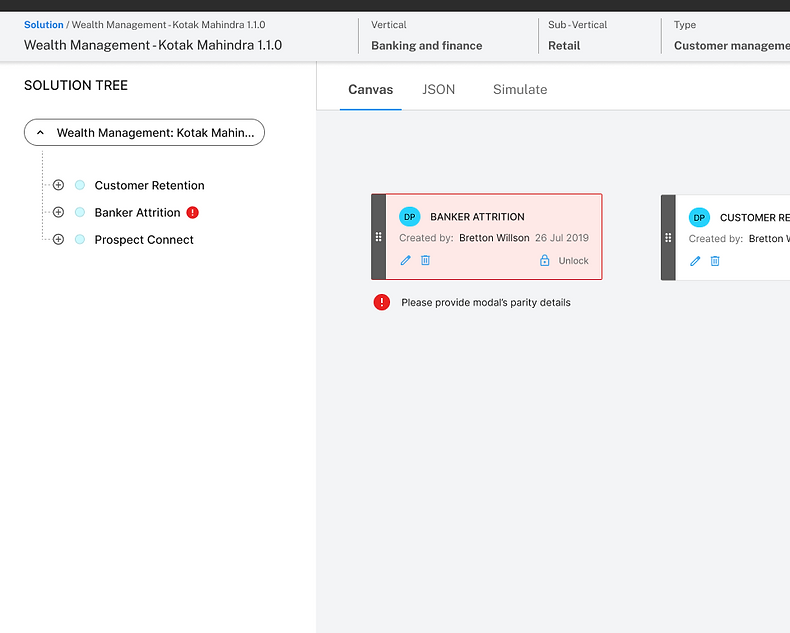
Intelligent Error Detection: Clear, actionable error messages for quick fixes.

Contextual Information: Display relevant details without overwhelming users.
/ Impact
50%
Reduction in time spent on workflow creation.
Improved accuracy by minimizing manual errors.
Faster validation with automated error detection.
/ What I learned
Designing Model Builder reinforced the importance of user-centric design and how small improvements can lead to significant efficiency gains. Through direct user research, I learned that system analysts needed clear, structured workflows and intuitive tools to reduce manual effort.
One of the biggest takeaways was the power of simplicity—reducing cognitive load through clear navigation and contextual information made the platform more accessible. Additionally, iterative design and testing played a crucial role; refining workflows based on user feedback led to a smoother experience.
This project also highlighted the impact of seamless error handling—by providing clear, actionable feedback, we enabled users to identify and resolve issues faster, ultimately improving adoption and trust in the platform.